Quickstart
Use spec17 to see which requirements in a project have tagged tests or references in code. You need a local copy of the project. If you don’t have one, try the example.
1. Install spec17 #
Install with Homebrew. Prebuilt releases are available for Apple Silicon Macs and for Linux on arm64 and x86_64.
brew tap kpavlov/spec17 https://github.com/kpavlov/spec17
brew install kpavlov/spec17/spec17
spec17 --version
The last command should print a version number. For Intel Macs and other systems without a prebuilt release, see Build from source.
2. Scan a project #
From the project root, run:
spec17 report
The report shows which requirements have tagged tests or references in code and which have neither. A tag shows that a test refers to a requirement. spec17 does not run the test or verify that the requirement is met.
If the report shows zero requirements, run spec17 doctor to see where spec17 looked. Check that you opened the right folder and that the project uses a supported requirement format.
3. Open the dashboard #
From the project root, run:
spec17
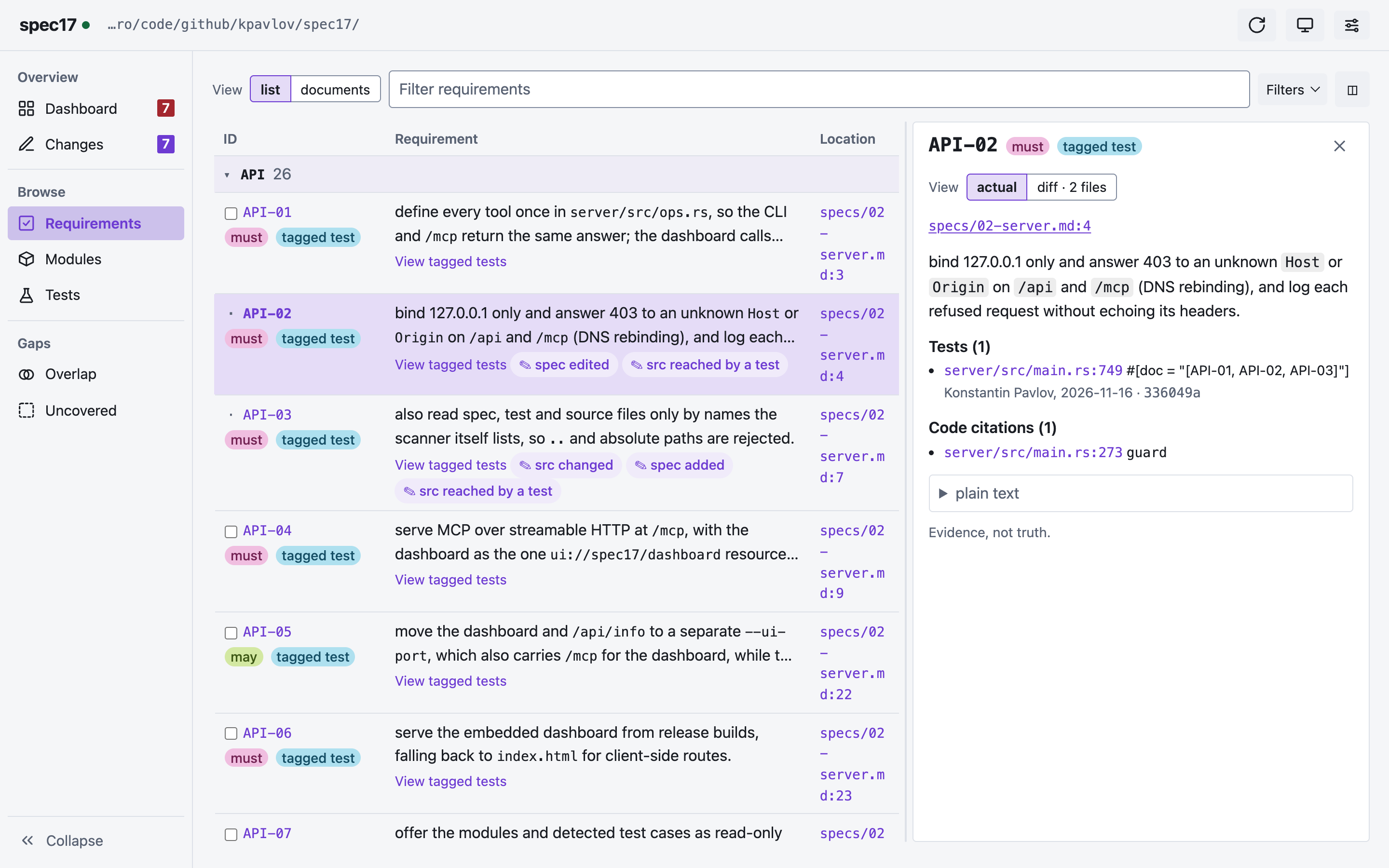
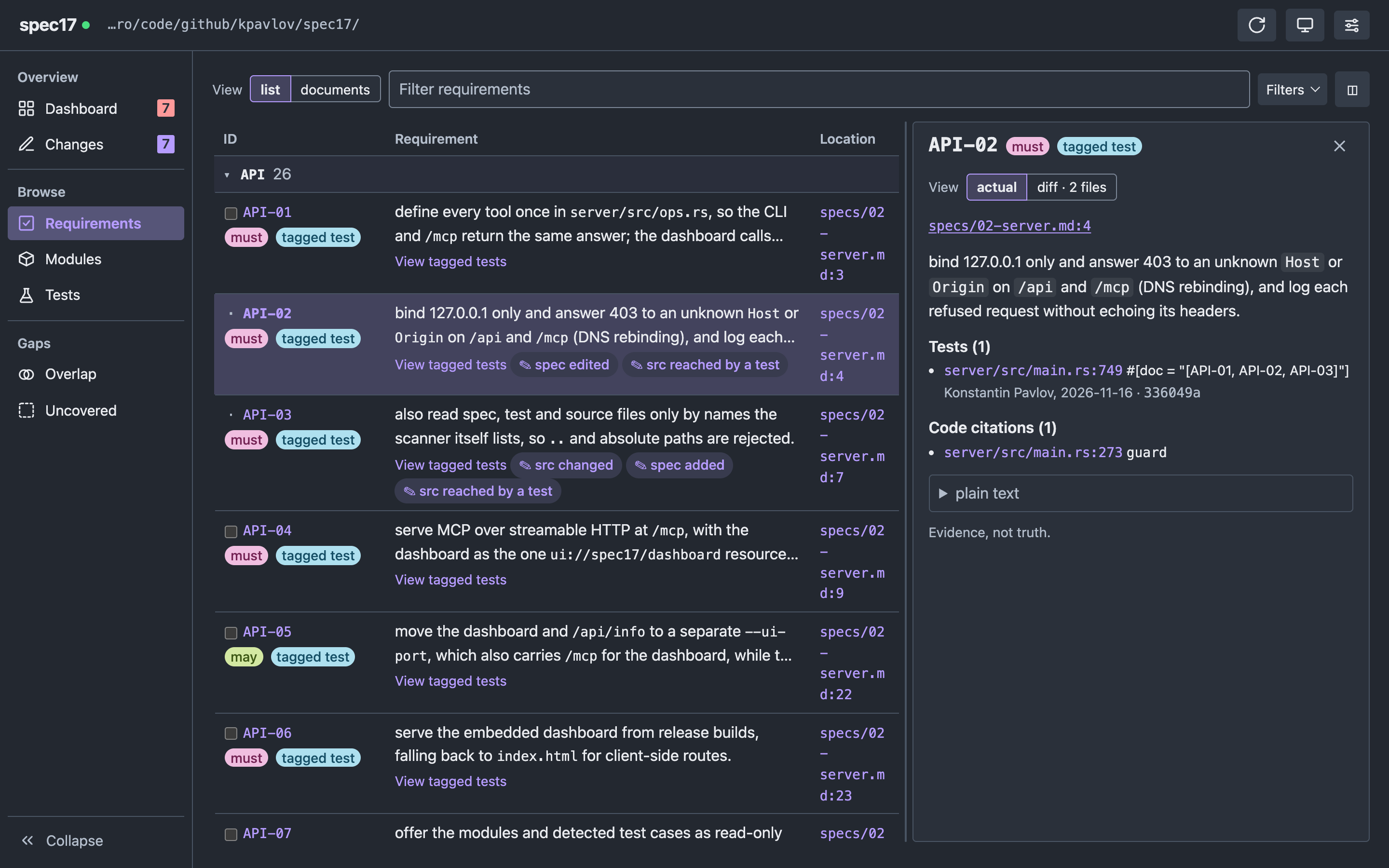
The dashboard opens at http://127.0.0.1:7411/. Select a requirement in Requirements to see its references. Stop the server with Ctrl+C.
The dashboard has no login and other users on the same computer can access it. On a shared computer, use spec17 report or follow the stdio setup for an AI coding assistant.
4. Connect an AI coding assistant #
If your assistant supports MCP and reads .mcp.json, run spec17 install from the project folder. This adds the spec17 skill and a connection to the local server. Start the server with spec17 if it isn’t already running, then start or restart the assistant in the same project.
Ask “Which requirements have no tagged test?” For other clients, setup options and troubleshooting, see Agents.
5. Try an example #
This example creates a temporary project with requirements, source code, and a tagged test. You don’t need Python to scan the files.
cd "$(mktemp -d)" && mkdir -p specs src tests && {
cat > specs/greeter.md <<'EXAMPLE'
# Greeter

- **GRT-01** MUST — greet a person by name.
- **GRT-02** SHOULD — greet the world when no name is given.
EXAMPLE
cat > src/greeter.py <<'EXAMPLE'
def greet(name=None):
    # (GRT-01) greet by name
    return f"Hello, {name or 'world'}!"
EXAMPLE
cat > tests/test_greeter.py <<'EXAMPLE'
from src.greeter import greet

def test_greets_by_name():
    """[GRT-01] greets by name"""
    assert greet("Ada") == "Hello, Ada!"
EXAMPLE
spec17 report
}
The report shows one of two requirements with a tagged test. Run spec17 trace GRT-01 to see the test and code reference:
GRT-01 MUST specs/greeter.md:3
  greet a person by name.
tests:
  tests/test_greeter.py:4  """[GRT-01] greets by name"""
source cites (file:line  declaration):
  src/greeter.py:2  greet  # (GRT-01) greet by name
related code (types the tests name; * = also cites the ID):
  none found
next: codegraph explore "greet"
Run spec17 status --missing to see GRT-02, which has neither:
GRT-02 none     specs/greeter.md:4  greet the world when no name is given.
TOTAL 1/2 tested (50%) | src-only 0 | none 1 | manual 0 | later 0 (0 with tests/code)
Other installation options #
Update an existing Homebrew installation with brew update && brew upgrade spec17.
For the rolling development build on Apple Silicon, install kpavlov/spec17/spec17-dev. Both formulas install a command named spec17, so uninstall one before installing the other.
Build from source #
You need Git, Make, Rust, Node.js, and pnpm to build spec17.
git clone https://github.com/kpavlov/spec17
cd spec17
make install
The command is installed in ~/.cargo/bin. Add that directory to your PATH if Terminal can’t find spec17. If you already have Homebrew, brew install --HEAD kpavlov/spec17/spec17 builds the default branch.